
How to Add Your Token to the Atomic Wallet Asset List
Launched your new crypto token? Hype's buzzing, but users can't hold it if it's missing from Atomic Wallet. Tokens die without easy wallet access real adoption starts when folks add, trade, and stake it smoothly. A top crypto token development company builds wallet-ready contracts with proper metadata, tests across Atomic/MetaMask/Trust, and preps listings upfront. No user errors, just seamless adoption. Skip it? Your token ghosts on-chain while rivals dominate UIs.
What is Atomic Wallet?
Atomic Wallet's a popular non-custodial setup you control your private keys, no middleman holding your funds. It juggles over 500 coins and tokens across chains like Ethereum, Binance Smart Chain, Bitcoin, Tron, and more, with built-in atomic swaps for trading without exchanges. Desktop for Windows/Mac/Linux, mobile for iOS/Android, plus staking, fiat on-ramps, and no KYC hassles. For token creators, its millions of downloads mean your project hits users fast once they can add or see it listed.
Two Paths to Get Your Token In
First path: Add it as a custom token, visible only in your (or that user's) wallet. Super quick for testing. Second: Pitch for official listing so it shows up by default for everyone. We'll walk through custom adds first easiest for most then the pro listing route. A crypto token development company preps your metadata right, making both paths painless.
Step-by-Step: Adding a Custom Token (Desktop & Mobile)
This is the core exact clicks and taps for anyone to add your token manually. Custom adds show only in their wallet (not official), but it's what gets early holders in quick. We'll break it down click-by-click.
What You Need Before Starting
Your token's contract address (0xabc123... exactly 42 chars), symbol ("MYTOKEN"), decimals (usually 18). Grab from Etherscan/BscScan or your crypto token development services docs screenshot it. Update Atomic to latest from atomicwallet.io. Note your wallet's ETH/BSC receive address (Wallet tab > token > Receive). Have 0.01 tokens ready in another wallet like MetaMask for testing.
Desktop Version Walkthrough
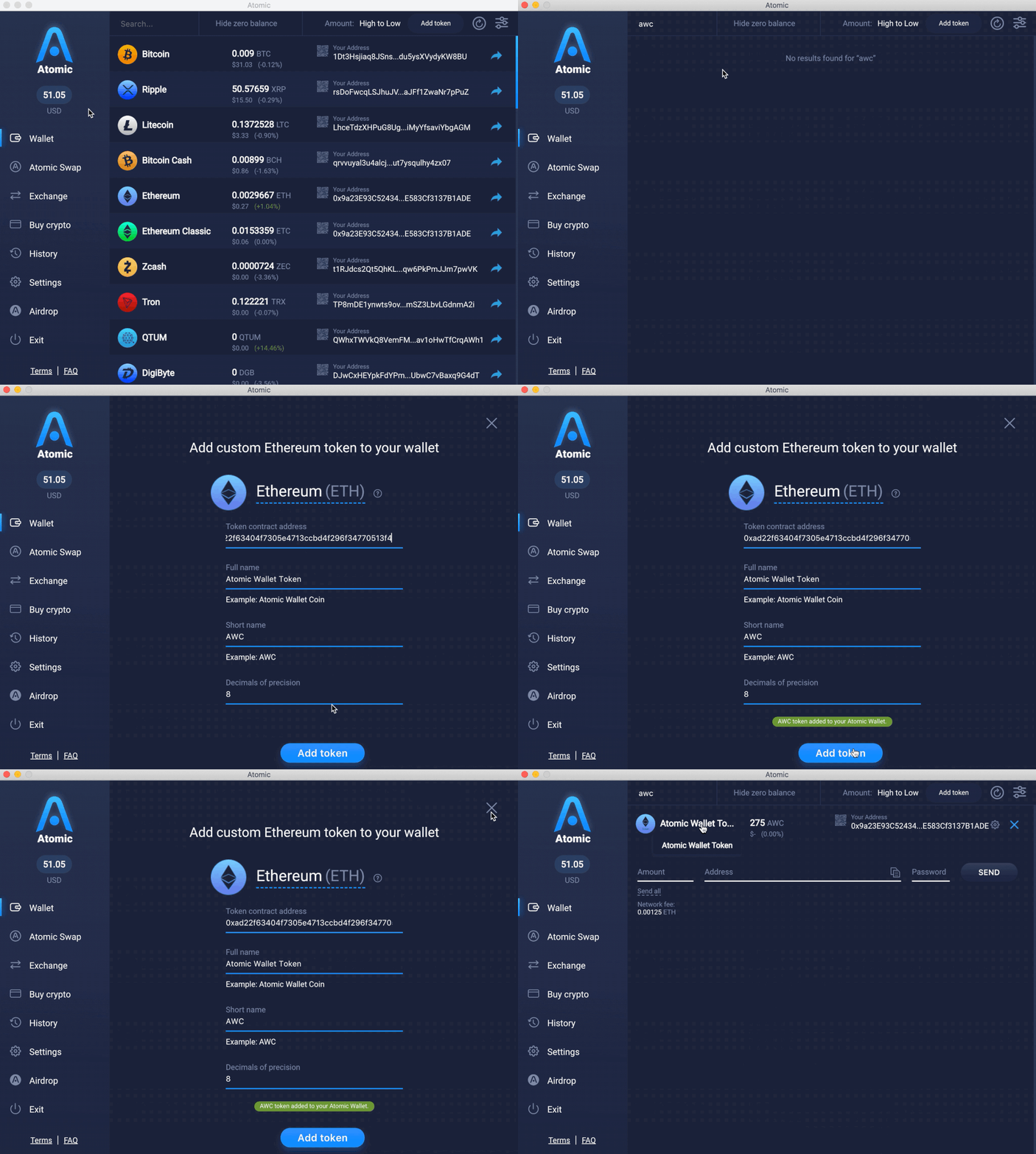
Download & Launch: Go to atomicwallet.io, grab the desktop app for your OS (Windows/Mac/Linux). Install if new. Double-click the Atomic Wallet icon on your desktop or start menu. Wait for it to fully load (shows splash screen, then main window). Check top-left corner for version number aim for 2025.x or whatever's current. If outdated, hit Settings (gear icon top-right) > "Check for Updates."
Enter Wallet Tab: Top navigation bar has tabs like "Wallet," "Swap," "Stake." Click "Wallet" (usually first tab). Screen shows your asset list ETH, BTC balances if any. If brand new wallet, it's empty except "Add Coin" prompts. Scroll if needed.
Locate Add Button: Top-right next to search bar (magnifying glass), spot green "+" button. If no +, scroll to very bottom of asset list for blue "Add Coin/Token" text link. Click whichever triggers dropdown menu or full popup window.
Select Custom Token Option: In the menu/popup, ignore "Popular Tokens" or "Buy Crypto" sections. Look for "Add Custom Token," "Add ERC-20/BEP-20 Token," or "Add by Contract Address." Click that exact option new form loads with fields.
Input Contract Address: Click into the big empty text field labeled "Contract Address" or similar. Right-click > Paste (or Ctrl+V) your full 0x... address no extra spaces, copy exactly from Etherscan. Press Enter key or just wait 5-15 seconds. Atomic connects to blockchain progress spinner shows, then auto-fills three fields below: Token Name (e.g., "My Great Token"), Symbol ("MTK"), Decimals ("18").
Double-Check & Tweak: Eyeball every field against your project's official docs/site. Name wrong? Click field and type fix. Symbol case off (e.g., "mtk" vs "MTK")? Edit it. Decimals not 18? Correct manually. If logo appears fuzzy or fields stay blank after 30 seconds, check your internet, re-paste address, or try different network (dropdown might be there).
Confirm and Save: Bottom-right blue button says "Add Token," "Import Token," or "Save." Click it. Success popup or green checkmark flashes ("Token added successfully"). Your new token instantly jumps into the main asset list (might be at bottom use search bar to find).
Full Refresh & Balance Test: Close Atomic completely Windows Task Manager (Ctrl+Shift+Esc > Processes > right-click Atomic > End Task); Mac Activity Monitor or Cmd+Q. Reopen app. Search bar top: type your symbol. Click token row > "Receive" tab > copy the long ETH/BSC address (QR code too). Switch to MetaMask/Uniswap, paste that address, send 0.01 tokens (approve gas fee ~$2). Back in Atomic: Pull search refresh or wait 30-90 seconds balance updates live. Still hidden? Settings (gear) > Display > toggle off "Hide zero balances." You're golden try swapping now. Total: 3-5 minutes.
Mobile App Details
Install & Launch: App Store (iOS) or Google Play (Android) search "Atomic Wallet," update to newest version first. Tap app icon from home screen/drawer. First launch? Allow camera (QR scans), notifications (tx alerts), storage. Wait for sync (shows loading spinner).
Load Wallet Screen: Bottom nav bar: 5 icons (Wallet, Swap, Stake, etc.). Tap "Wallet" (coin stack icon, usually #2). Screen loads portfolio total balance top, asset list below, search bar up top.
Open Add Menu: Three ways pick easiest: (a) Tap magnifying glass in search bar > "Add Token" shows. (b) Swipe entire screen down (pull-to-refresh) > menu pops. (c) Tap three dots ⋮ top-right corner > "Add Token." Or hunt + icon by total balance. Menu slides up.
Choose Contract Add: Tap "Add Token" row > sub-menu: Skip "Popular" or "Buy." Select "Add by Contract Address" or "Custom Token." Tiny network selector pops (super important!).
Pick Network & Enter Address: Dropdown: "Ethereum Mainnet" for ERC-20s, "BSC Mainnet" for BEP-20, etc. wrong one fails quietly. Tap correct, then paste contract into field below (long-press field > Paste). Hit blue "Next" or arrow button. App queries chain (spinner 5-20 seconds) auto-fills Name, Symbol, Decimals.
Verify Every Detail: Scroll preview: Does "MyToken (MTK)" look right? Decimals 18? Logo crisp? Wrong? Tap fields to edit. Case matters sometimes. Green checkmark bottom if perfect. Red error? Invalid address re-paste.
Hit Add & Confirm: Tap big blue "Add Token" or checkmark icon. Quick toast notification: "Token added to wallet!" New token appears bottom of list (or search it). No restart needed usually.
Refresh & Live Test: Pull down whole screen (like email inbox) to force refresh. Or swipe app away (iOS: swipe up > flick; Android: recent apps > close). Reopen. Tap your token > "Receive" > copy address or scan QR. From MetaMask app: Send 0.01 tokens to it (gas pays). Back in Atomic: 1-3 minutes sync (faster on 5G/mobile data vs WiFi). Balance shows? Settings > Assets > "Show zero balance tokens" toggle if vanished. Swap away done. Pro move: Enable tx notifications first.
Auto-Detection Hack
No typing: Send 0.001 tokens to matching chain address. Force-close/reopen app auto-scans tx history, adds 90% time. Perfect for airdrops.
Sloppy contracts frustrate users. Crypto token development company like LBM Solution builds wallet-ready from scratch.
Also read our other Blogs on:
How to List a Token on the Coin Carp
How to List Your Token on CoinGecko
How to List a New Currency on Coinranking
Hands-On Example: Adding an ERC-20 Token
Real walk-through with "SuperCoin" (ERC-20 Ethereum) your users do this exact flow.
Hunt Contract: Browser to etherscan.io. Search bar: "SuperCoin." Top result > "Contract" tab (blue link). Copy "0x742d35Cc6634C0532925a3b844Bc454e4438f44e" button. Verify matches project site/Twitter phishers mimic.
Desktop Flow: Atomic > Wallet tab > green + > "Add by Contract" > paste address > wait spinner > auto-sees "SuperCoin (SUPR)", 18 decimals > eyeball match > "Add Token" > quit/reopen > search "SUPR."
Balance Proof: Token row > Receive > copy ETH address. MetaMask: Connect Uniswap > paste address > swap ETH for 1 SUPR (gas ~$2, slippage 1%) > confirm tx. Atomic: 60 seconds > "1 SUPR" glows.
Mobile Mirror: App > Wallet > ⋮ > Add Token > Ethereum Mainnet > paste same address > verify SUPR/18 > Add > pull refresh > Receive > send same test from MetaMask app > balance lives 2 mins later.
90 seconds flat. Wrong address = zero/wrong name. Official source only.
Pushing for Official Asset List Inclusion
Custom's fine for you, but official listing broadcasts your token to all Atomic users no manual adds needed. Hit up their support at [email protected] or the form on atomicwallet.freshdesk.com (search "list asset"). Prep a clean package: project name, ticker/symbol, full contract addresses per chain, high-res logo (PNG 256x256+), website, socials, explorers (Etherscan links), liquidity proof (DEX volume), and audit reports. They check security, activity, and no rugs takes weeks, but approved tokens get priority UI spots.
Why Partner with a Crypto Token Development Company?
Launching solo means wrangling Solidity code, Gas optimizations, audits from PeckShield/Certik, tokenomics, and wallet/exchange listings. A crypto token development company like LBM Solution covers it all: Custom ERC-20/BEP-20/RCP-20 contracts, multi-chain deploys, metadata for 20+ wallets (Atomic, Trust, MetaMask), and listing pitches. They dodge pitfalls like revert errors or blacklist risks, getting you live faster with users actually using your token.
Troubleshooting Common Headaches
Token Added But Blank: Restart app, toggle "Hide zero balances," or enable address activation in Settings > Assets (unhides dust). Wrong chain? Switch to ETH Mainnet. Details Wrong or Zero Balance: Bad contract copy re-paste from official explorer. Network congestion delays sync; wait 10 mins or rescan blockchain. Mobile Won't Refresh: Force quit, clear cache (Settings > Advanced), or reinstall backups keep keys safe.
Smart Tips for Token Launch Teams
Plaster contract/symbol/decimals on your landing page, GitHub, and Telegram pin.
Use standard decimals (18) and short symbols (3-6 chars) for compatibility.
Test adds in Atomic/others pre-launch fix metadata via proxy upgrades if needed.
Bundle with DEX listings (Uniswap/Pancake) for liquidity proof in wallet pitches.
FAQs
Q1. Can every ERC-20 go in Atomic Wallet?
A. Any standards-compliant one works with the contract address Atomic scans the blockchain directly.
Q2. Sent tokens, but nothing shows?
A. Restart or add manually; confirm address/network match, and enable hidden assets.
Q3. Custom vs official what's better?
A. Custom for quick personal use; official for mass adoption since everyone sees it instantly post-approval.
Q4. Do i have to hire a crypto token development company?
A. Yes, DIY possible for basics, but pros handle audits, multi-wallet prep, and listings cuts months off launch.
Haven't added Token in Atomic yet? For seamless crypto token development services from contract to wallet dominance, contact LBM Solution they turn ideas into traded assets fast.
Planning this work? Start with the token launch guide.
As Chief Technology Officer at LBM Solutions, Manjit Parmar oversees technical strategy, infrastructure, and product development. His expertise in Blockchain and AI enables the creation of secure, data-driven, and scalable systems aligned with business growth and innovation.
Keep reading
SaaS vs AaaS: A Complete Breakdown of Both Models in 2026
Learn the difference between SaaS and AaaS, how AI agents work, and why businesses are shifting toward autonomous software systems.
The Real Guide to AI Real Estate App Development (2026)
Plan your AI real estate app in 2026, features, cost, tech stack & tips to find the right AI real estate app development company.
How Stablecoins Are Replacing Traditional Bank Accounts in 2026
Learn about How Stablecoins Are Replacing Traditional Bank Accounts in 2026. This comprehensive guide covers everything you need to know for beginners.
Build it with engineers.
Manual review plus Slither, Mythril, and Echidna. Fixed-fee quote in 48 hours.